|
Size: 5735
Comment:
|
← Revision 73 as of 2014-04-25 20:57:57 ⇥
Size: 6200
Comment:
|
| Deletions are marked like this. | Additions are marked like this. |
| Line 17: | Line 17: |
| * [[IFO Modeling/RC_lengths|Recycling cavity lengths and effect of arm cavity resonances]] | * [[IFO_Modeling/RC_lengths| Recycling cavity lengths and effect of arm cavity resonances]] |
| Line 19: | Line 19: |
| * [[IFO Modeling/PowerBudget|Power Budget / Recycling gains]] | * [[IFO_Modeling/PowerBudget| Power Budget / Recycling gains]] |
| Line 22: | Line 22: |
| * [[IFO Modeling/SensingMatrix|Sensing Matrix]] | * [[IFO_Modeling/SensingMatrix| Sensing Matrix]] |
| Line 32: | Line 32: |
| * [[IFO Modeling/Curvature_Mismatch|Contrast defect by the curvature mismatch]] | * [[IFO_Modeling/Curvature_Mismatch| Contrast defect by the curvature mismatch]] |
| Line 41: | Line 41: |
| . By Matt Evans. . The Optickle modeling package is part of the ISCmodeling tools. The SVN contains the latest version as of Feb-02-2010. . It is independent to looptickle. [[IFO_Modeling/Optickle|Optickle Wiki]] |
. By Matt Evans. The Optickle modeling package is part of the ISCmodeling tools. The SVN contains the latest version as of Feb-02-2010. It is independent to looptickle. . [[IFO_Modeling/Optickle| 40m Optickle Wiki]] . [[http://blue.ligo-wa.caltech.edu:8000/advligo/ISC_Modeling_Software|aLIGO Optickle model wiki]] |
| Line 52: | Line 50: |
| . attachment:IFO_diagram.png | . {{attachment:IFO_diagram.png}} |
| Line 69: | Line 67: |
| . [attachment:IFOtuning.pdf In this document] I discuss the details behind the choices. | . [[attachment:IFOtuning.pdf|In this document]] I discuss the details behind the choices. |
| Line 73: | Line 71: |
| . By Stefan Ballmer. The documentation file for it is [attachment:looptickle_README.txt this]. | . By Stefan Ballmer. The documentation file for it is [[attachment:looptickle_README.txt|this]]. |
| Line 107: | Line 105: |
| . [[IFO Modeling/RC lengths|Recycling cavity lengths]] | . [[IFO_Modeling/RC_lengths| Recycling cavity lengths]] |
| Line 115: | Line 113: |
| . [[IFO Modeling/SIS_Introduction|Introduction to SIS]] | . [[IFO_Modeling/SIS_Introduction| Introduction to SIS]] ------ == MIST Modeling == Simulation of PD Transfer functions with CARM offset . {{attachment:carm2REFL11.png}} . {{attachment:carm2REFLDC.png}} . {{attachment:carm2TRX.png}} . {{attachment:darm2AS55.png}} |
Contents
IFO Modeling
- Modeling of the interferometer is always useful for many purposes:
- Interferometer design
- Optical configurations
- Signal extraction and control schemes
- Noise budget
- Trouble shooting / Noise hunting
- Interferometer design
- Once upon a time analytical calculations were almost the only way for any meaningful interferometer calculation. But that sort of folkloric era has been over. The interferometer configuration have got much more complicated since recycling techniques were committed to practical use. Now we are facing on the dual recycling issues. None of the design could be done without IFO modeling. The modeling is now one of the indispensable skills of a real interferometer person.
Key points of the IFO Modeling
- Optical configuration
Recycling cavity lengths and effect of arm cavity resonances
- Effect of optical losses
- Signal extraction
- Length signal extraction
- 3f demodulation for lock acquisition
- Detuning
- Signal handing off procedure
- Alignment signal extraction
- MC WFS
- Dither alignment
- Aux Laser injection
- Length signal extraction
- Noise budget
- Higher order mode (HOM) studies
- HOM cleaning/enhancement by recycling
- Misalignment and alignment sensing
IFO Modeling Tools
- IFO modeling tools can be found in the svn directoryhttps://nodus.ligo.caltech.edu:30889/svn/trunk/ifomodeling/.
Optickle
- By Matt Evans. The Optickle modeling package is part of the ISCmodeling tools. The SVN contains the latest version as of Feb-02-2010. It is independent to looptickle.
40m Upgrade Optickle Model
- The 40m model file is contained under the config40m directory of looptickle.
- The model represents the interferometer according to this layout:
- A dual recycled interferometer could be set in different configurations (for a discussion on the topics see: Kokeyama K. et al. Class. Quantum Grav. 25 (2008) 235013 (12pp)).
- The 40m will follow the choices for Advanced LIGO.
The single sub-cavities of the model are individually set in the following ways:
Arm Cavities: resonant for the carrier; non-resonant for the sidebands
Michleson: resonant for the carrier; Schnupp asymmetry of 0.0307 m
PRC: anti-resonant for the carrier; resonant for both sidebands
SRC: resonant for the carrier; resonant for the f2 sideband; non-resonant for f1
- In particular, since the model adds no microscopic offset to the SRM position, and the cavity length is set equal to c/f2, the SRC is by default resonant for the carrier. That means that when the arms are locked, the carrier becomes anti-resonant and f2 resonant.
- (By adding an optional microscopic offset of lambda/4 the SRC would become resonant for the carrier when the arms are locked. In that case f2 would be anti-resonant. - not desirable)
In this document I discuss the details behind the choices.
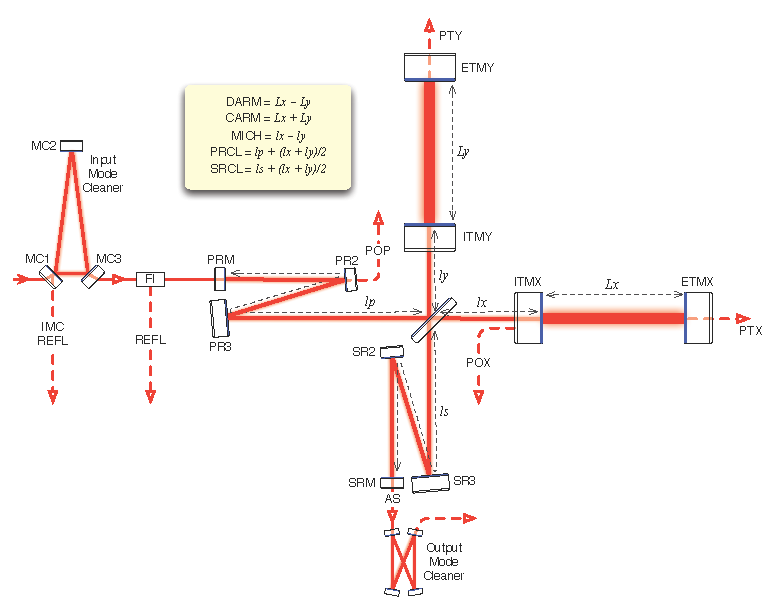
Looptickle
By Stefan Ballmer. The documentation file for it is this.
- Next time Stefan comes visit us, we can try to ask him to explain Looptickle a bit more.
- It is crucial for the demo files in the looptickle package to run, to have the Matlab path set properly.
- Especially since the iscmodeling directory often contains different copies of the same functions,
- some of which are obsolete and just cause conflicts.
- Also looptickle gets confused by other junk optickle and looptickle structures, or tickle matrices left around in the matlab workplace. It's highly recommended to clear the workplace before starting to work with a new structure. Otherwise error messages are very likely to interrupt you.
- Here's how the command lines for the first run should be:
Matlab model of optical cavities
By Alberto. It is a semi-analythical modeling package. The two building blocks of the models are a Fabry-Perot function and a Michelson function. Each function replaces either a cavity or a Michelson, with an effective compound mirror. The functions return complex reflectance and transmittance. The input parameters are the most generic. The surfaces of all mirrors are treated individually, i.e. reflectance and transmittance can be set independently for each side of a mirror.
- Macroscopic length and microscopic offsets are passed to the functions as parameters.
- By nesting any combination of cavities in the proper way and order, one can build up a compound mirror representing coupled cavities or the whole interferometer. Then the reflectivity and transmissivity of the compound mirror will be the Bright and Dark port outputs, respectively.
- All functions contain a help description on how to use it.
Finesse
SIS
- SIS is an FFT-based simulation program written and maintained by Hiro. It is useful for simulation of non-ideal optical surfaces (surface roughness, mesa beams) and thermal effects (lensing, ROC errors).
MIST Modeling
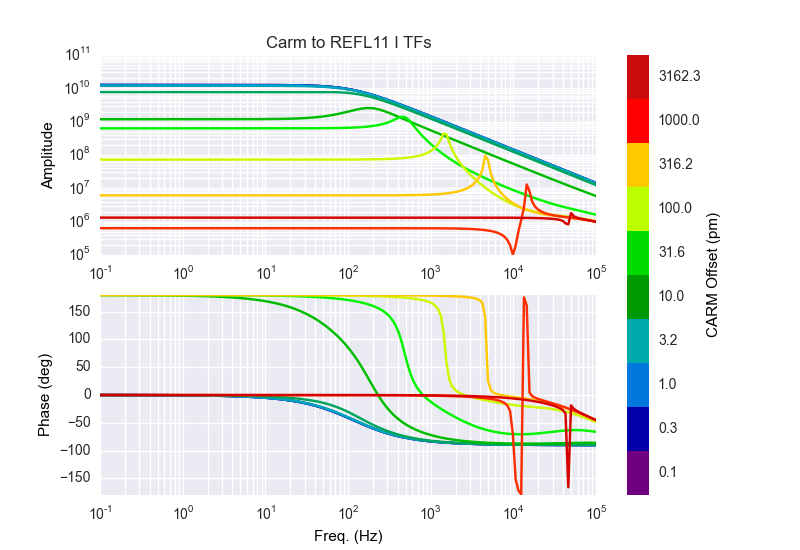
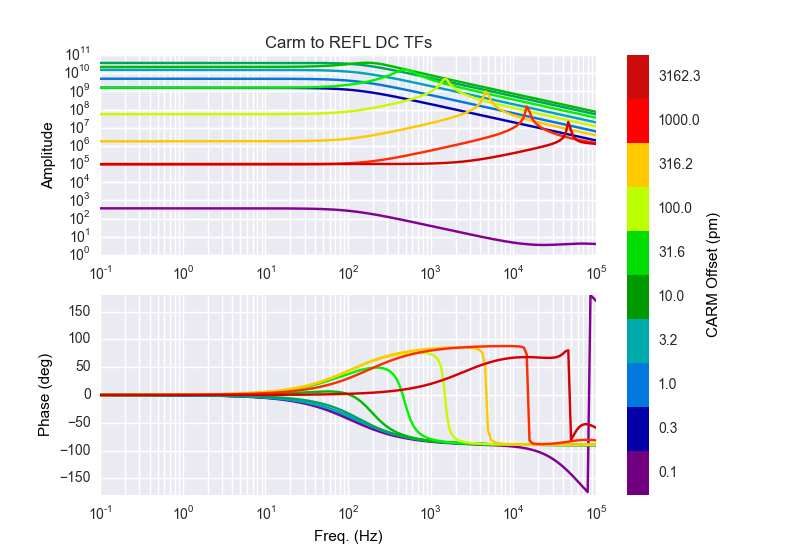
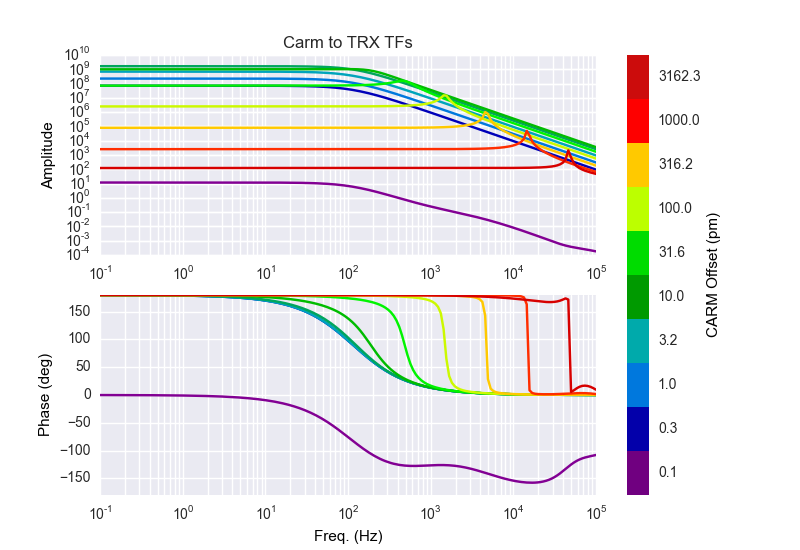
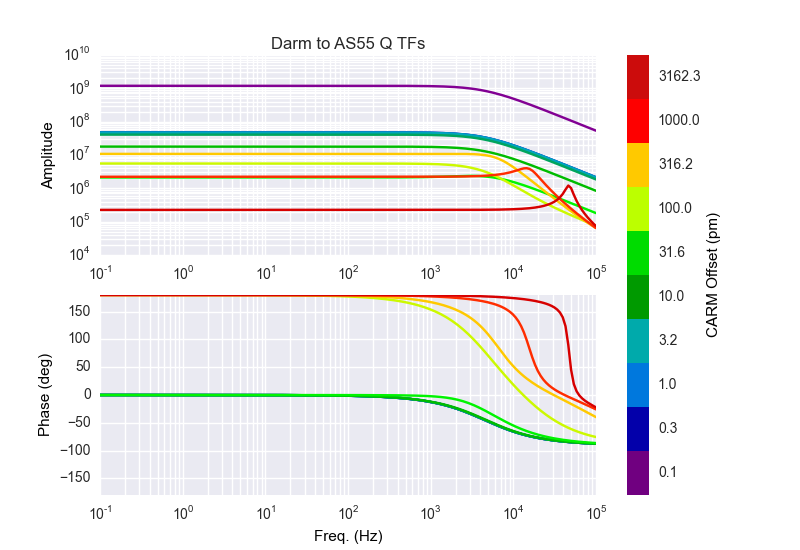
Simulation of PD Transfer functions with CARM offset