
Here are the Procedures of what to check after an earthquake.
Earthquake Status
Go to the USGS Website and elog the Time, Location, and Magnitude of the Earthquake. The link is '''Here'''
Vacuum Status
Check the medm Screen of and look for Anomalies in pressure. An attached screenshot of the C0VAC_MONITOR.adl Screen is shown. This is the normal operating status of the pumped down 40m Vac System (As of June 2024).
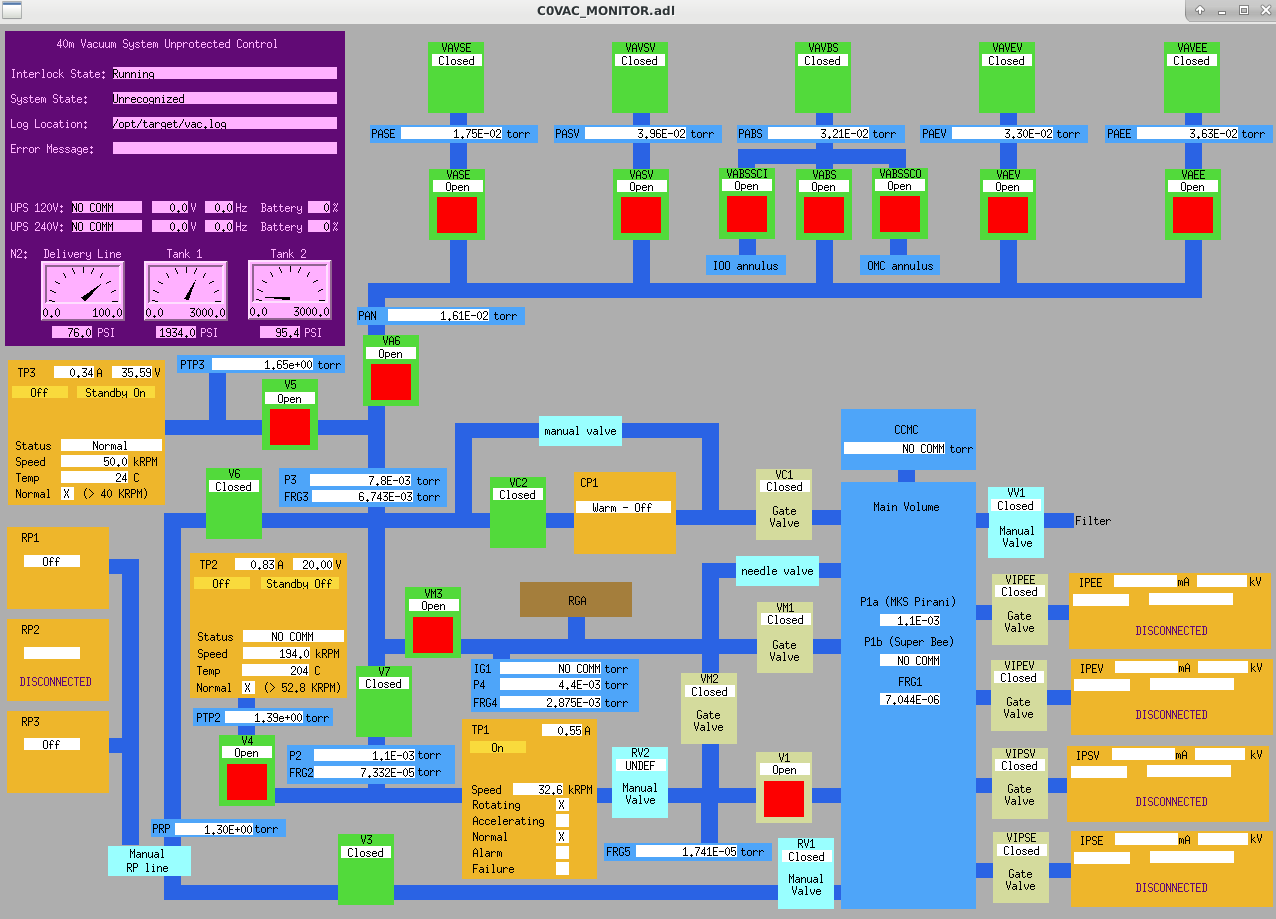
Prioritize checking and elog-ing the following:
• FRG1 Pressure - This is the pressure of the main volume. If the 40m System is pumped down, this should be in the low 10E-5 - high 10E-6 torr range.
• Nitrogen Status - the Delivery line must be above 75 PSI with Tanks 1 && 2 above 1500 PSI. If either of the tanks are below 500 PSI, PLEASE USE DATA VIEWER TO REVIEW THE LAST WEEK OF THE PRESSURE TO ENSURE FULL USAGE OF THE NEAR-EMPTY TANK.
• Turbo Pump Status - TP1, TP2, and TP3 must show the "Normal" box with an "X" showing this is operating correctly. If the earthquake is strong enough, TP1 could be knocked onto its Safety Bearing and switched into "Alarm" and "Failure" mode. If this happens, close all valve and review the PumpDownProcedure.
CDS Status