
Photodetector Frequency Response [PDFR] Measurement System
A diode laser, whose out-put power is amplitude modulated by its drive current, is used to illuminate the PDs. This laser requires 2 currents - a DC current to make it lase and a modulating signal to perform amplitude modulation. The modulation current is provided by a network analyzer (Agilent 4395A) and a diode laser controller (ILX LDC 3744C) is used to provide the DC current and also monitor its temperature. The diode laser's amplitude modulated output is divided using a 1x16 Optical Splitter and routed to separate PDs. The RF (Radio Frequency) output of each PD at the 40m lab is routed to a demodulator board. This demodualtor board is used in the Pound-Drever-Hall technique to lock Fabry-Perot cavities of the interferometer and is out of scope of this project. However the board has an output named PD RF MON (Radio Frequency Monitor) that just follows the input and is to be used for checking the PD. The PD RF MON output is attenuated compared to the actual output of the PD and our system needs to take this into account. The RF signal from each PD will be fed to the network analyzer using a 16x1 RF multiplexer, which allows us to select an individual PD. The network analyzer produces a swept sine wave (modulating signal) over a range of preset measurement frequencies and measures the amplitude and phase response of the RF (Radio Frequency) output of the PD under test. This gives us the response of the PD across the range of frequency.It also divides the Test PDs output by the Ref PDs output to account for variation in laser output power and sends this transfer function data wirelessly to the control room computers, where the transimpedance values are calculated and plotted against frequency. These plots are then compared with canonical plots to check if the PD is still functioning as it should be.
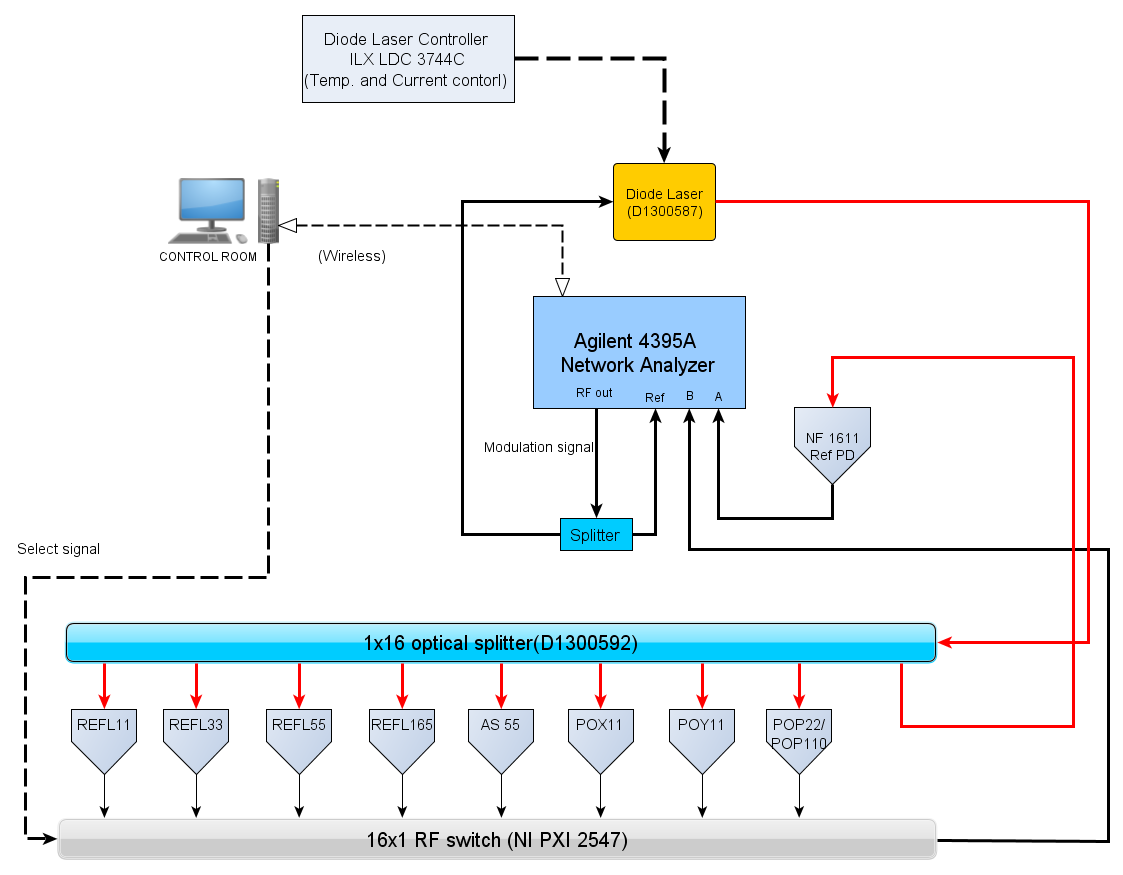
Location of the instruments:
- Diode laser Contorller ILX LDC 3744C : Rack 1Y1
- Diode laser : Rack 1Y1
- RF multiplexer NI PXI 2547: Rack 1Y1
- Reference PD NF1611: POY table
- Network Analyzer: Mobile cart
Logic behind the transimpedance measurement:
Transimpedance measurement with a Reference PD
Setting up the system
- Connect the RF out from network analyzer to the modulating input of the diode laser.
- The LDC 3744C located right below the laser must be turned on start the laser to lase. The current has to be set at 150.0 mA as the rest of my code currently holds DC measurements all taken at this current.
- The LDC turns on after you have turned the switch with the key and then the button OUTPUT in the laser section of the instrument's panel.
- Connect REF DET cable (RF output from reference PD) to input R of NA.
- The Output from the RF multiplexer should be connected to input A or B on the NA. Make sure you change the parameters in the script to be A/R or B/R respectively.
Getting the transimpedance plots
- Option A: Run the script from MEDM screen PDFR that can be located on the sitemap and obtain the transimpedance plots.
Option B: Running from the terminal -> /scripts/PDFR -> ./PDFR_main PDname
Understanding the PDFR
- All parameters related to the network analyzer is present in /scripts/PDFR/param_NWAG4395A.yml
The DC measurement readings and the frequency scan ranges for each PD is set in param_PDname.yml located at /scripts/PDFR/param_PDname.yml
The transfer function of the Demodulator boards are in ZPK format located in 3 files namely z.dat,p.dat and k.dat inside /scripts/PDFR/PDname
- The transfer function for time delay in the RF cables is located along with the above 3 files as TDelay.dat
Any changes needed to be made to PDFR because of changes in delay value or the transfer function or changes to DC output values (if the laser is set at a different current)can be done by changing the values in these files
Setting a new baseline graph : In order to change the canonical graph that is displayed along with each measurement, make a softlink to that particular measurement's .dat file inside the folder /scripts/PDFR/PDname and name the link as baseline
There are buttons on the MEDM screen that bring up the previously made measurement. This works by having a softlink called previous inside /scripts/PDFR/PDname. This softlink keeps getting updated everytime you make a measurement.