
|
Size: 6300
Comment:
|
← Revision 71 as of 2012-01-03 23:02:37 ⇥
Size: 6685
Comment: converted to 1.6 markup
|
| Deletions are marked like this. | Additions are marked like this. |
| Line 10: | Line 10: |
| [[BR]] | <<BR>> |
| Line 14: | Line 14: |
| ||<|3> plans and overviews|| ''' CDS home page ''' || [:Upgrade_09/CDS] || || ''' CDS plan for August ''' || [:Upgrade_09/CDS/August_CDS_test] || || ''' Simulated Plant''' ||[:Simulated_Plant] || ||<|2> Lists || ''' Current Hardware Lists ''' || [:Upgrade_09/CDS/current_hardware] || || ''' Channel Assignments for C1SUS ''' || [:Upgrade_09/CDS/Suspension_wiring_to_channels] || ||<|3> Technical Notes || ''' Notes about CDS realtime code ''' || [:Notes_on_getting_the_CDS_Realtime_Code_Generator_working] || || ''' Notes for Green Locking interface to realtime code ''' || [:Notes_for_Green_locking_interface_to_RCG] || || ''' Notes for Simulated Plant ''' ||[:Notes_for_the_RCG_40m_simulated_plant] || |
||<|3> plans and overviews|| ''' CDS home page ''' || [[Upgrade_09/CDS]] || || ''' CDS plan for August ''' || [[Upgrade_09/CDS/August_CDS_test]] || || ''' Simulated Plant''' ||[[Simulated_Plant]] || ||<|2> Lists || ''' Current Hardware Lists ''' || [[Upgrade_09/CDS/current_hardware]] || || ''' Channel Assignments for C1SUS ''' || [[Upgrade_09/CDS/Suspension_wiring_to_channels]] || ||<|3> Technical Notes || ''' Notes about CDS realtime code ''' || [[Notes_on_getting_the_CDS_Realtime_Code_Generator_working]] || || ''' Notes for Green Locking interface to realtime code ''' || [[Notes_for_Green_locking_interface_to_RCG]] || || ''' Notes for Simulated Plant ''' ||[[Notes_for_the_RCG_40m_simulated_plant]] || |
| Line 24: | Line 24: |
| [[BR]] | <<BR>> |
| Line 28: | Line 28: |
| || attachment:green.png '''complete'''|| attachment:orange.png '''intermediate state ''' || attachment:red.png '''incomplete''' || attachment:black.png gave up|| | || {{attachment:green.png}} '''complete'''|| {{attachment:orange.png}} '''intermediate state ''' || {{attachment:red.png}} '''incomplete''' || {{attachment:black.png}} gave up|| |
| Line 30: | Line 30: |
| [[BR]] | <<BR>> |
| Line 33: | Line 33: |
| . attachment:orange.png design an adapter box for the breakout boards . attachment:red.png make the box and install it |
. {{attachment:orange.png}} design an adapter box for the breakout boards . {{attachment:red.png}} make the box and install it |
| Line 36: | Line 36: |
| . attachment:orange.png rearrange the channel assignments . attachment:orange.png test all the BO channels and their assignments . attachment:green.png Switching over cabling from the current XY220's to the new system |
. {{attachment:orange.png}} rearrange the channel assignments . {{attachment:orange.png}} test all the BO channels and their assignments . {{attachment:green.png}} Switching over cabling from the current XY220's to the new system |
| Line 40: | Line 40: |
| . attachment:green.png damping all the vertex suspensions with the new CDS . attachment:green.png check if the binary outputs are working . attachment:orange.png make the daq daemon work |
. {{attachment:green.png}} damping all the vertex suspensions with the new CDS . {{attachment:green.png}} check if the binary outputs are working . {{attachment:orange.png}} make the daq daemon work |
| Line 44: | Line 44: |
| . attachment:green.png renewal of realtime control model . attachment:orange.png renewal of medm screens for the vertex suspensions . attachment:orange.png separate optics into some realtime models instead of one model in order to avoid run time issues |
. {{attachment:green.png}} renewal of realtime control model . {{attachment:orange.png}} renewal of medm screens for the vertex suspensions . {{attachment:orange.png}} separate optics into some realtime models instead of one model in order to avoid run time issues |
| Line 48: | Line 48: |
| . attachment:green.png fix {{{ feCodeGen.pl }}} script [[BR]] |
. {{attachment:green.png}} fix {{{ feCodeGen.pl }}} script <<BR>> |
| Line 52: | Line 52: |
| . attachment:green.png make a new IPC parser . attachment:green.png string the RFM optical fiber connecting C1SUS and C1ISCEX . attachment:green.png switching the RFM old network to that of the new one by using the RFM bypath . attachment:green.png install PCI-5565 driver if it's necessary . attachment:orange.png test the RFM card by running the diagnostic script . attachment:orange.png test the RFM with the epics |
. {{attachment:green.png}} make a new IPC parser . {{attachment:green.png}} string the RFM optical fiber connecting C1SUS and C1ISCEX . {{attachment:green.png}} switching the RFM old network to that of the new one by using the RFM bypath . {{attachment:green.png}} install PCI-5565 driver if it's necessary . {{attachment:orange.png}} test the RFM card by running the diagnostic script . {{attachment:orange.png}} test the RFM with the epics |
| Line 61: | Line 61: |
| . attachment:red.png Check we have correct number of cables . attachment:green.png Check if both end stations are correctly running |
. {{attachment:red.png}} Check we have correct number of cables . {{attachment:green.png}} Check if both end stations are correctly running |
| Line 65: | Line 65: |
| . attachment:green.png Move the computer into 1X2 rack . attachment:green.png remove Marconi(?) and put a new IO chassis on 1X2 rack . attachment:green.png check timing/ADC/DAC on the IO chassis. And make it works (5 days) |
. {{attachment:green.png}} Move the computer into 1X2 rack . {{attachment:green.png}} remove Marconi(?) and put a new IO chassis on 1X2 rack . {{attachment:green.png}} check timing/ADC/DAC on the IO chassis. And make it works (5 days) |
| Line 69: | Line 69: |
| . attachment:green.png Check on fiber with Rolf for LSC . attachment:green.png timing/ADC/DAC check |
. {{attachment:green.png}} Check on fiber with Rolf for LSC . {{attachment:green.png}} timing/ADC/DAC check |
| Line 72: | Line 72: |
| [[BR]] | <<BR>> |
| Line 76: | Line 76: |
| . attachment:green.png conceptual design . attachment:green.png make realtime simlink model . attachment:orange.png compile and install the model |
. {{attachment:green.png}} conceptual design . {{attachment:green.png}} make realtime simlink model . {{attachment:orange.png}} compile and install the model |
| Line 81: | Line 81: |
| . attachment:green.png conceptual design . attachment:green.png make realtime simlink model . attachment:orange.png compile and install the model |
. {{attachment:green.png}} conceptual design . {{attachment:green.png}} make realtime simlink model . {{attachment:orange.png}} compile and install the model |
| Line 86: | Line 86: |
| . attachment:red.png renew the model with the new CDS parts . attachment:red.png compile and install the model |
. {{attachment:red.png}} renew the model with the new CDS parts . {{attachment:red.png}} compile and install the model |
| Line 89: | Line 89: |
| [[BR]] | <<BR>> |
| Line 92: | Line 92: |
| . attachment:green.png rebuild the frame builder by Gentoo OS . attachment:orange.png get dataviewer working . attachment:green.png install a heavy duty DAQ router |
. {{attachment:green.png}} rebuild the frame builder by Gentoo OS . {{attachment:orange.png}} get dataviewer working . {{attachment:green.png}} install a heavy duty DAQ router |
| Line 96: | Line 96: |
| . attachment:orange.png diskless boot seetings on the frame builder . attachment:orange.png run the front end machines with Gentoo realtime core . attachment:green.png run a realtime code on a new realtime Gentoo |
. {{attachment:orange.png}} diskless boot seetings on the frame builder . {{attachment:orange.png}} run the front end machines with Gentoo realtime core . {{attachment:green.png}} run a realtime code on a new realtime Gentoo |
| Line 101: | Line 101: |
| [[BR]] [[BR]] |
<<BR>> <<BR>> |
| Line 106: | Line 106: |
| attachment:1X1_1X2_racks.png | {{attachment:1X1_1X2_racks.png}} |
| Line 108: | Line 108: |
| New rack setup in pdf form attachment:1X1_1X2_racks.pdf | New rack setup in pdf form [[attachment:1X1_1X2_racks.pdf]] |
| Line 117: | Line 117: |
| [[BR]] [[BR]] |
<<BR>> <<BR>> |
| Line 123: | Line 123: |
| [[BR]] [[BR]] |
<<BR>> <<BR>> |
| Line 133: | Line 133: |
| . {i} [[Upgrade_09/CDS/current_hardware|Current Hardwares Lists]] | . {i} [[Upgrade_09/CDS/current_hardware| Current Hardwares Lists]] |
| Line 135: | Line 135: |
| [[BR]] [[BR]] |
<<BR>> <<BR>> |
| Line 143: | Line 143: |
| [[BR]] | <<BR>> |
| Line 146: | Line 146: |
| || <<ImageLink(BO_final.png, void, height=260)>> || <<ImageLink(BO_test.png, void, height=260)>> || | || [[void|{{attachment:BO_final.png||height=260}}]] || [[void|{{attachment:BO_test.png||height=260}}]] || |
| Line 149: | Line 149: |
| . A datasheet for the BO card is here attachment:contec32BO.pdf | . A datasheet for the BO card is here [[attachment:contec32BO.pdf]] |
| Line 151: | Line 151: |
| [[BR]] [[BR]] |
<<BR>> <<BR>> |
| Line 160: | Line 160: |
| [[BR]] [[BR]] |
<<BR>> <<BR>> |
| Line 167: | Line 167: |
| . <<ImageLink(green_sm.png, void, height=340)>> | . [[void|{{attachment:green_sm.png||height=340}}]] |
| Line 170: | Line 170: |
| . <<ImageLink(green_simlated_plant.png, void, height=340)>> | . [[void|{{attachment:green_simlated_plant.png||height=340}}]] |
| Line 175: | Line 175: |
| [[BR]] [[BR]] |
<<BR>> <<BR>> |
| Line 179: | Line 179: |
| [[BR]] [[BR]] |
<<BR>> <<BR>> |
September CDS plan
Major Missions
 Complete damping of the vertex suspensions
 - Preparation for Green locking
- Simulated plants
Useful Links
category |
description |
Links |
plans and overviews |
CDS home page |
|
CDS plan for August |
||
Simulated Plant |
||
Lists |
Current Hardware Lists |
|
Channel Assignments for C1SUS |
||
Technical Notes |
Notes about CDS realtime code |
|
Notes for Green Locking interface to realtime code |
||
Notes for Simulated Plant |
PLANS
TO DO LIST
 complete
 intermediate state
  incomplete
  gave up
A. Complete suspension damping keeping in mind Version B coils. (1-2 days?)
ADC break out boards
- design an adapter box for the breakout boards
- make the box and install it
Binary Output working on c1sus (Alex/Joe) 1-2 days
- rearrange the channel assignments
- test all the BO channels and their assignments
- Switching over cabling from the current XY220's to the new system
damping test with the BOs
- damping all the vertex suspensions with the new CDS
- check if the binary outputs are working
- make the daq daemon work
refinement of the control model
- renewal of realtime control model
- renewal of medm screens for the vertex suspensions
- separate optics into some realtime models instead of one model in order to avoid run time issues
misc.
- fix feCodeGen.pl script
B. Preparation for Green Locking
Get RFM working (3-4 days)
- make a new IPC parser
- string the RFM optical fiber connecting C1SUS and C1ISCEX
- switching the RFM old network to that of the new one by using the RFM bypath
- install PCI-5565 driver if it's necessary
- test the RFM card by running the diagnostic script
- test the RFM with the epics
Get both end stations working
- Check we have correct number of cables
- Check if both end stations are correctly running
Get IOO front end machine working
- Move the computer into 1X2 rack
- remove Marconi(?) and put a new IO chassis on 1X2 rack
- check timing/ADC/DAC on the IO chassis. And make it works (5 days)
Fix non-working IO chassis
- Check on fiber with Rolf for LSC
- timing/ADC/DAC check
C. Simulated Plant
Simulated Green Locking
- conceptual design
- make realtime simlink model
- compile and install the model
LSC simulated plant
- conceptual design
- make realtime simlink model
- compile and install the model
SUS simulated plant
- renew the model with the new CDS parts
- compile and install the model
D. Frame builder
rebuild frame builder
- rebuild the frame builder by Gentoo OS
- get dataviewer working
- install a heavy duty DAQ router
diskless boot
- diskless boot seetings on the frame builder
- run the front end machines with Gentoo realtime core
- run a realtime code on a new realtime Gentoo
PSL Racks Setup

New rack setup in pdf form 1X1_1X2_racks.pdf
WISH LIST
(not urgent things, but somethings we want to implement at some points)
channel wiki
wiki hyperlink on a medm screen
TIME LINE SCHEDULE
- Put time line schedule here.
DETAILED CONSIDERATIONs
Cable Requirements
- Do we have sufficient number of the cables ?
- Let's doublecheck it.

Notes about Binary Outputs
- To obtain a voltage signal, a pull-up resister and a DC voltage are needed at the receiver stage because the signal is generated with a transistor.
- An easy way to check this BO system is putting an LED on the receiver stage as described in the figure below. In this case if the signal is ON the LED lights up and vice versa.
normal operation
test configuration
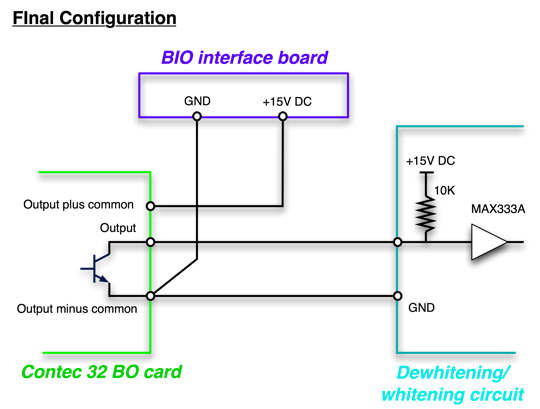
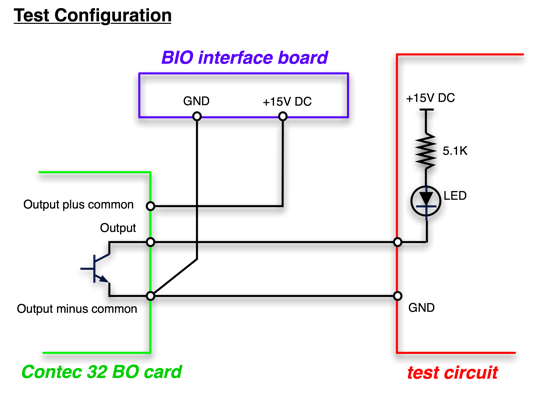
A datasheet for the BO card is here contec32BO.pdf
Reflective Memory Network
- What is the temporary configuration ?
- What is the final configuration ?
Simulated Plant for Green locking
Conceptual Design


Model construction
Gain Mismatch