
|
Size: 1387
Comment:
|
Size: 2432
Comment:
|
| Deletions are marked like this. | Additions are marked like this. |
| Line 12: | Line 12: |
| {{attachment:chanList.png||align="center",width=800}} |
{{attachment:chanList.png||align="center",width=800}} * There may already be a `.xml` template file created for the set of channels you are interested in, these will be stored in `/Users/Templates/Dataviewer_Templates` on the shared drive. {{attachment:openTemplate.png||align="center",width=800}} == Where are the channel name files actually stored? == * For the fast system, they are stored in `.ini` files at `/opt/rtcds/caltech/c1/chans/daq/`, with the file name being that of the fast model. For example, all channels associated with the `c1als` model will be stored in `/opt/rtcds/caltech/c1/chans/daq/C1ALS.ini`. '''You should not modify these files''' - they are created / edited by the autocompile routines of `rtcds`. * For the slow channels, they are stored in individual `.db` files, which are grouped by subsystem at `/cvs/cds/caltech/target/`. For example, the NPRO diagnostic channels are defined in `/cvs/cds/caltech/target/c1psl/npro.db`. These files '''can''' (and indeed often must if new channels are being added) be edited, '''but only if you know what you are doing'''. |
Finding CDS channels
Sometimes, we want to view a list of available CDS channels, either to live stream data, or to look back at trends. The most accurate reflection of the current list of channels is stored in various .txt/.ini/.par files, but futzing with these carries the risk of un-intentionally changing something that then breaks everything. Listed here are some read-only alternative techniques.
RTCDS system channels
For the fast RTCDS system, we can infer the channel name by tracing the block names in the RTCDS model, which can be viewed in a read-only fashion at our Simulink WebView page. But the dataviewer method described next can also be used.
Acromag (a.k.a. slow CDS system) channels
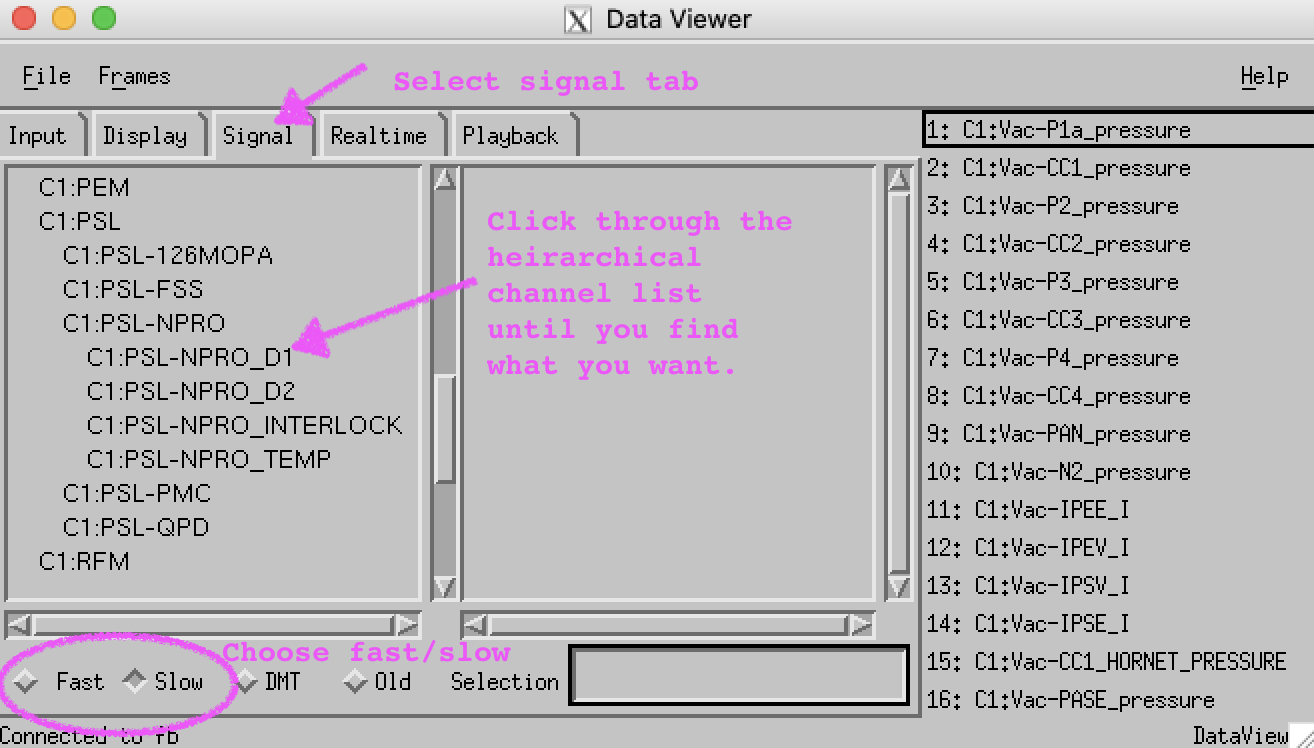
The most convenient interactive way to sort through the channels available in the slow CDS system is to use dataviewer. At the time of writing, dataviewer is only available on the pianosa control room workstation. We are moving towards using ndscope in favor of dataviewer, but the former does not have a GUI for channel browsing.
To launch, simply type dataviewer in a terminal on pianosa.
- In the window that is launched, go to the "Signal" tab, select the appropriate channel system (Fast = RTCDS, Slow = Acromag).
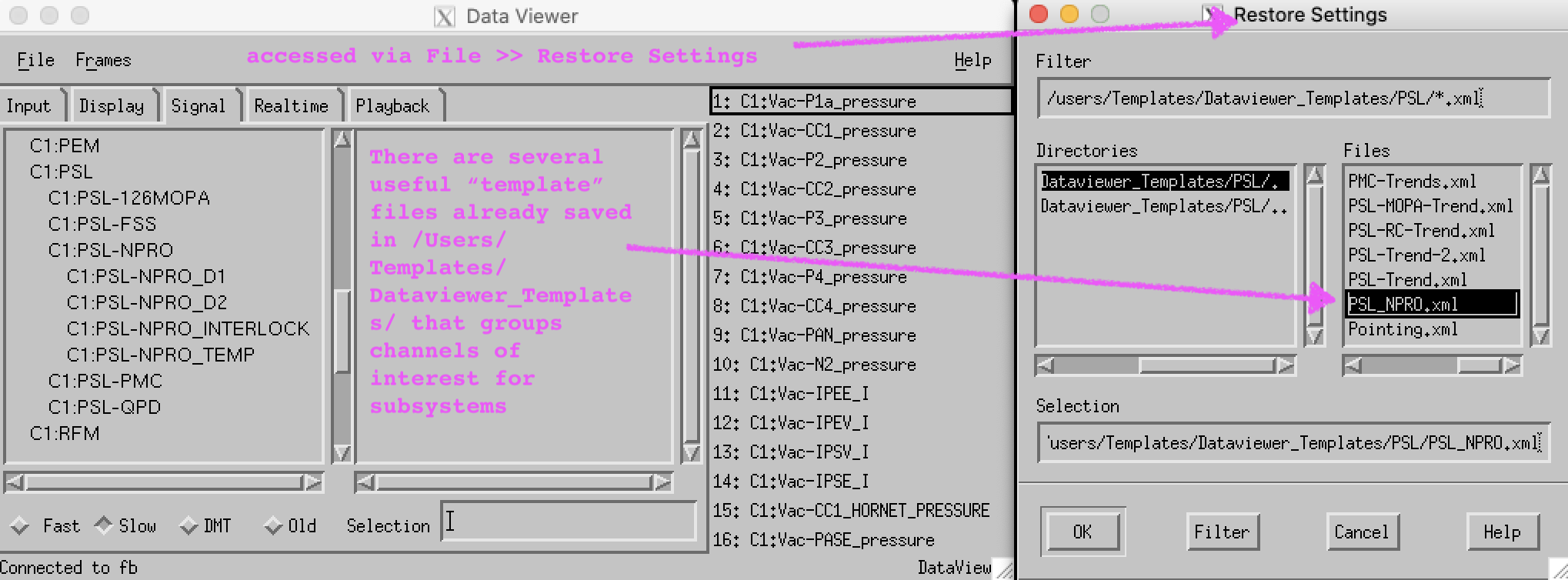
There may already be a .xml template file created for the set of channels you are interested in, these will be stored in /Users/Templates/Dataviewer_Templates on the shared drive.
Where are the channel name files actually stored?
For the fast system, they are stored in .ini files at /opt/rtcds/caltech/c1/chans/daq/, with the file name being that of the fast model. For example, all channels associated with the c1als model will be stored in /opt/rtcds/caltech/c1/chans/daq/C1ALS.ini. You should not modify these files - they are created / edited by the autocompile routines of rtcds.
For the slow channels, they are stored in individual .db files, which are grouped by subsystem at /cvs/cds/caltech/target/. For example, the NPRO diagnostic channels are defined in /cvs/cds/caltech/target/c1psl/npro.db. These files can (and indeed often must if new channels are being added) be edited, but only if you know what you are doing.