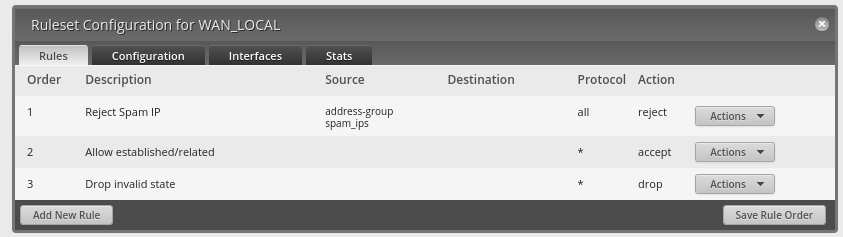
|
Size: 2309
Comment:
|
Size: 4050
Comment:
|
| Deletions are marked like this. | Additions are marked like this. |
| Line 32: | Line 32: |
| * Block particular IP (banned IPs) to get through the martian firewall * Path outgoing packets through the firewall, except for the ones towards the banned IPs. |
* Block particular IP (banned IPs) to go through the martian firewall * Pass outgoing packets through the firewall, except those towards the banned IPs. |
| Line 35: | Line 35: |
| 1. Firewall screen | 1 Firewall screen |
| Line 40: | Line 40: |
| 1. aaa | * Here the first line describes the behavior of the outgoing packets. The default action is "accept." So unless the rules do not reject packets, they go through. * The second line describes the behavior of the packets going through the NAT router. '''We accept all the packets going through the NAT router'''. It may look strange. Naively, we don't have the internal machines '''directly''' exposed to the outside of the firewall. So it seems that this is not necessary. However, to make the port forwarding successful, this setting is necessary. As we have no "global" machine inside, we don't need to worry about unlimited access from outside. * The last line describes the behavior of the packets go to the NAT router from WAN. This supports all the exposed services to outside via port forwarding. 2 Configure an IP group for the banned IPs. In Fiwewall/NAT Groups tab, the IP groups can be configured. The listed IPs here is used to ban the access to the local machines including PortFowarded services (e.g., elog). One can add more IPs here when necessary. |
| Line 43: | Line 51: |
3-1 Firewall Policies for LAN to WAN access. There is only one policy registered. It blocks outgoing packets to the banned IPs. It is probably not necessary in a usual case. Still, at the time of the configuration, it seemed that there were established connections to these IPs needed to block outgoing packets. |
|
| Line 44: | Line 56: |
3-2 Rejection setting to the banned IP group. It is important to enable it to make it active. (When you remove the rule, it needs to be disabled.) |
|
| Line 45: | Line 60: |
3-3 Advanced Tab: It is important to check these states to make this filter work. |
|
| Line 46: | Line 64: |
3-4 Destination Tab: Use "Address Group" to specify the destination. (Remember this is the outgoing packets) |
|
| Line 47: | Line 68: |
4 In |
NAT Router configuration
NAT Router is Ubiquiti Networks "Edge Router 4"
NAT Router has been configured (by Larry@LIGO GC) through the GUI interface, which is only available from the martian network. To launch the GUI interface, simply access to the martian IP of the router (192.168.113.2) with a web browser. You can find the user name and password at the usual secret place. User Name: 40Mubnt Password: ll@cit_admin_ubnt

Open ports:
- 22 (ssh) - port forwarded to nodus
- 873 (rsync) - port forwarded to nodus
- 8080/8081 (elogd) - port forwarded to nodus
- 30889 (apache) - port forwarded to nodus
- 31200 (NDS) - port forwarded to megatron
- 22220 (ssh) - port forwarded to port 22 on c1teststand for direct ssh access.
Along with the NAT router installation, firewall rule of the shorewall on nodus was turned off as it is no longer necessary. We still neet to keep shorewall itself running to open the specified ports. The WAN (GC net) side cable of nodus was removed. NodusShorewallSetting
- To log into c1teststand from outside internet (usual martian workstation passwords):
ssh controls@nodus.ligo.caltech.edu -p 22220
- To log into nodus from outside internet (you know the password if you are supposed to know it):
ssh controls@nodus.ligo.caltech.edu
NAT Router Firewall configuration
As of Aug 15, 2023
Policy:
- Block any access to the NAT router from outside of the firewall
- Block particular IP (banned IPs) to go through the martian firewall
- Pass outgoing packets through the firewall, except those towards the banned IPs.
1 Firewall screen
- The firewall setting should look like this.
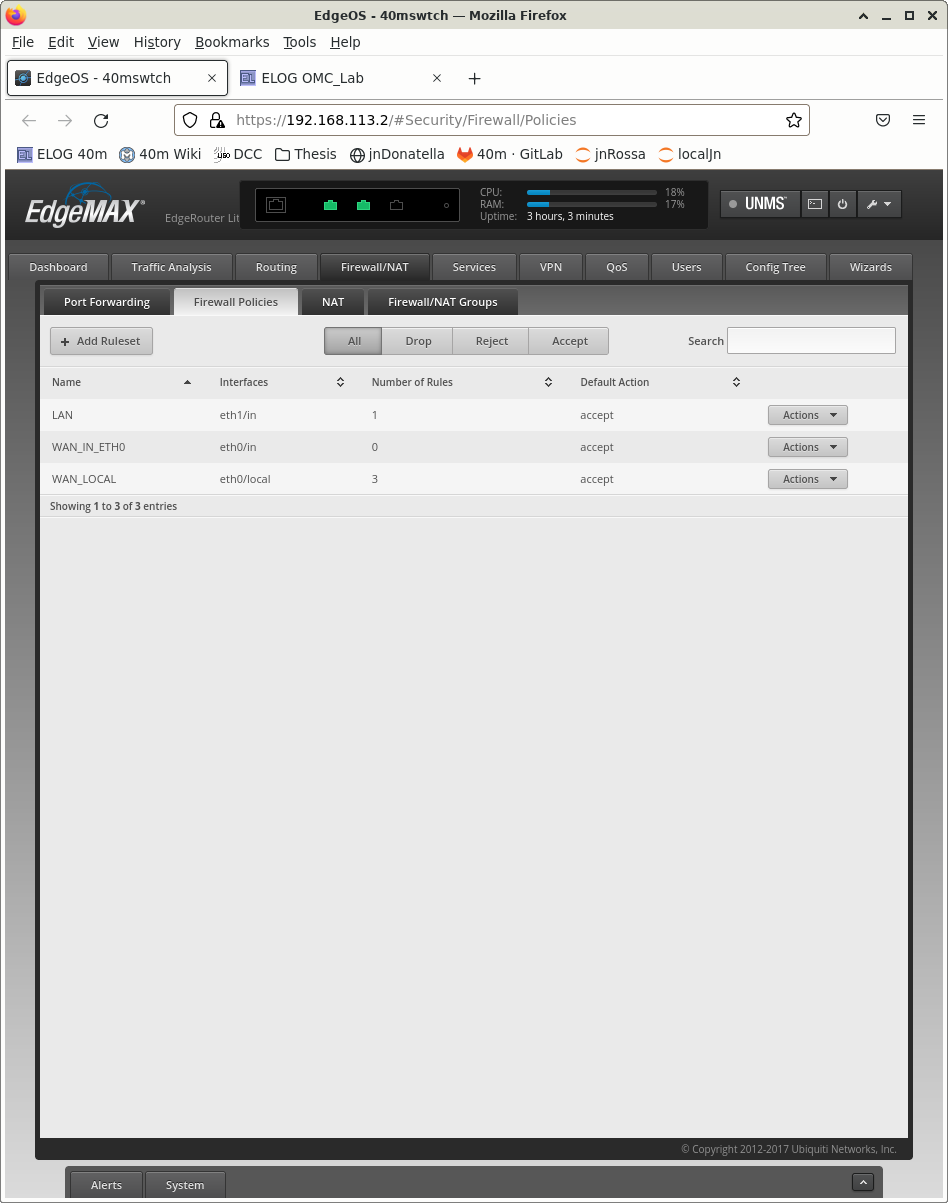 FW.png
 - Here the first line describes the behavior of the outgoing packets. The default action is "accept." So unless the rules do not reject packets, they go through.
The second line describes the behavior of the packets going through the NAT router. We accept all the packets going through the NAT router. It may look strange. Naively, we don't have the internal machines directly exposed to the outside of the firewall. So it seems that this is not necessary. However, to make the port forwarding successful, this setting is necessary. As we have no "global" machine inside, we don't need to worry about unlimited access from outside.
- The last line describes the behavior of the packets go to the NAT router from WAN. This supports all the exposed services to outside via port forwarding.
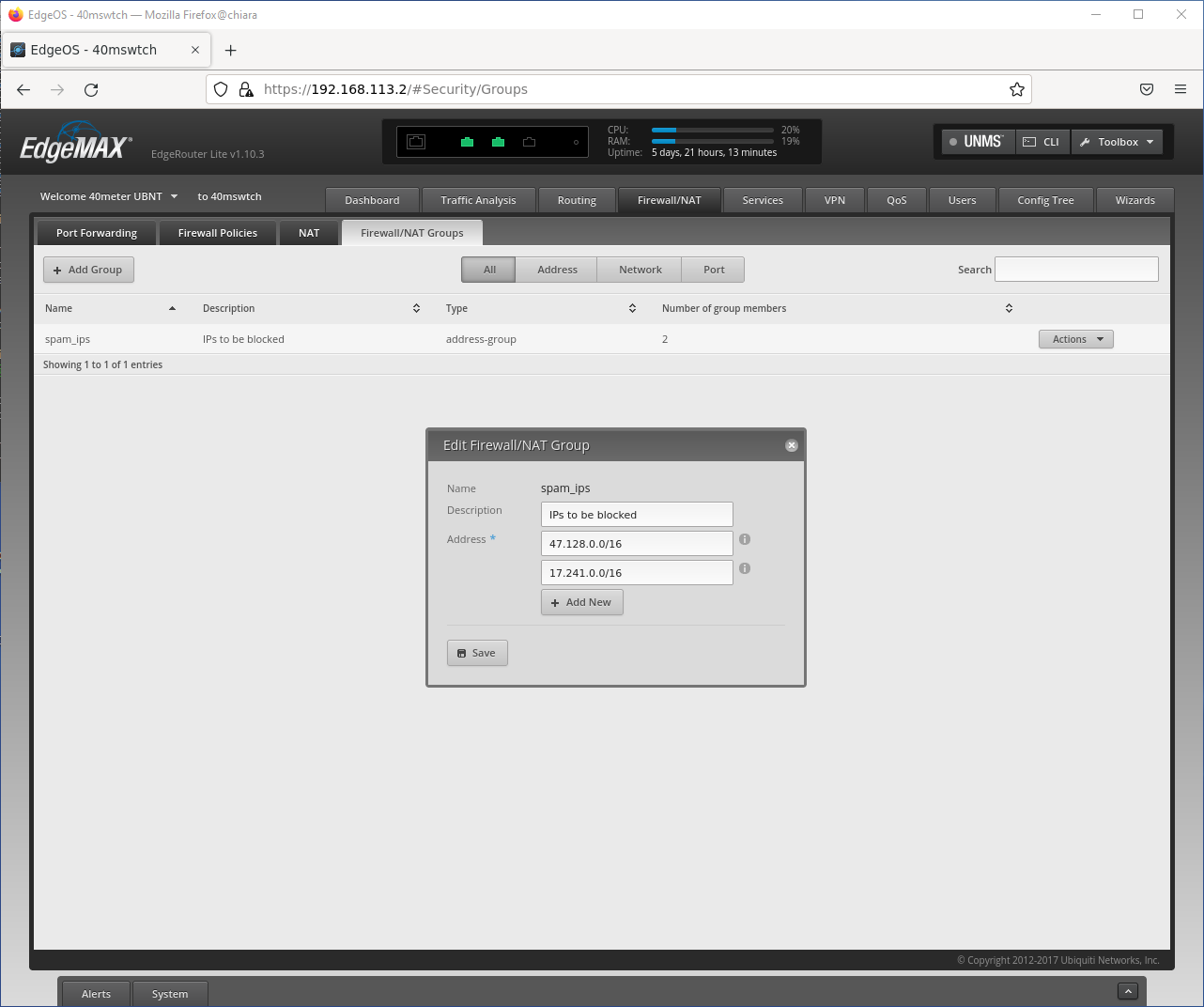
2 Configure an IP group for the banned IPs.
In Fiwewall/NAT Groups tab, the IP groups can be configured. The listed IPs here is used to ban the access to the local machines including PortFowarded services (e.g., elog). One can add more IPs here when necessary.
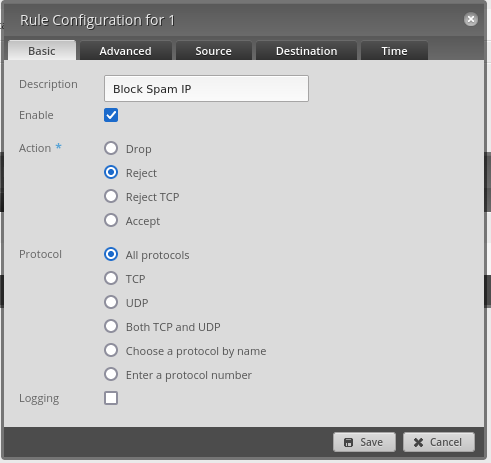
3-1 Firewall Policies for LAN to WAN access. There is only one policy registered. It blocks outgoing packets to the banned IPs. It is probably not necessary in a usual case. Still, at the time of the configuration, it seemed that there were established connections to these IPs needed to block outgoing packets.

3-2 Rejection setting to the banned IP group. It is important to enable it to make it active. (When you remove the rule, it needs to be disabled.)
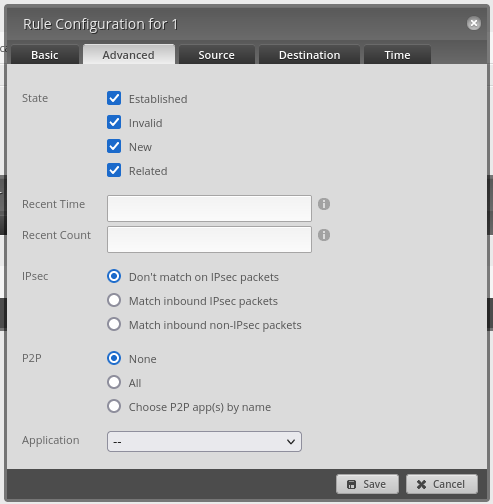
3-3 Advanced Tab: It is important to check these states to make this filter work.
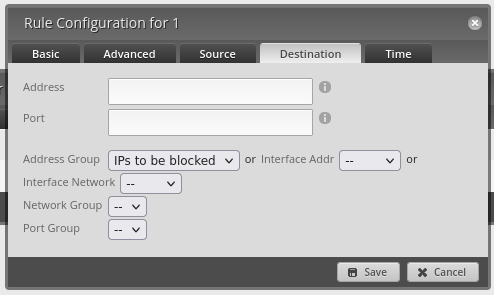
3-4 Destination Tab: Use "Address Group" to specify the destination. (Remember this is the outgoing packets)
4 In