
|
Size: 5390
Comment:
|
Size: 2897
Comment: From now on, I (Joonho Lee) is using Justin's access for edting this page.
|
| Deletions are marked like this. | Additions are marked like this. |
| Line 56: | Line 56: |
| || 16 || IMCT || not aligned ? || | || 16 || PMCT || :) || |
| Line 70: | Line 70: |
| === Note that this table shows the current channel assignment and that X is used for East arm and Y is used for South arm === | |
| Line 72: | Line 73: |
| . <<ImageLink(monitos.png, monitors and channels, height=150)>> | . <<ImageLink(monitos.png, monitors and channels, height=150)>> |
| Line 77: | Line 78: |
| '''Input Channels''' | '''Note that this diagram is for VIDEO system upgrades so Y is used for East arm and X is used for South arm. ''' |
| Line 79: | Line 80: |
| ||''' Channel number ''' ||''' where its signal is coming ''' ||''' type ''' || ||''' 1 ''' ||''' C1:IO-VIDEO 1 MC2 ''' ||''' TBD-1 ''' || || 2 || FI CAMERA || 59 || || 3 || PSL OUTPUT CAMERA || 59 || ||''' 4 ''' ||''' BS C:1O-VIDEO 4 ''' ||''' TBD-1 ''' || || 5 || MC1&3 C:1O-VIDEO 5 || 59 || ||''' 6 ''' ||''' ITMX C:1O-VIDEO 6 ''' ||''' TBD-1 ''' || ||''' 7 ''' ||''' C1:IO-VIDEO 7 ITMY ''' ||''' TBD-1 ''' || ||''' 8 ''' ||''' C1:IO-VIDEO 8 ETMX ''' ||''' TBD-1 ''' || ||''' 9 ''' ||''' C1:IO-VIDEO 9 ETMY ''' ||''' TBD-1 ''' || || 10 || "No cable is connected (spare channel)" || || || 11 || C1:IO-VIDEO 11 RCR || 59 || || 12 || C1:IO-VIDEO RCT || 59 || || 13 || MCR VIDEO || 59 || || 14 || C1:IO-VIDEO 14 PMCT || 59 || || 15 || VIDEO 15 PSL IOO(OR IOC) || 59 || ||''' 16 ''' ||''' C1:IO-VIDEO 16 IMCT ''' ||''' TBD-1 ''' || ||''' 17 ''' ||''' PSL CAMERA ''' ||''' 58 ''' || || 18 || C1:IO-VIDEO 18 IMCR || 59 || || 19 || C1:IO-VIDEO 19 SPS || 59 || ||''' 20 ''' ||''' C1:IO-VIDEO 20 BSPO ''' ||''' TBD-1 ''' || ||''' 21 ''' ||''' C1:IO-VIDEO 21 ITMXPO ''' ||''' TBD-1 ''' || || 22 || C1:IO-VIDEO 22 APS1 || 59 || ||''' 23 ''' ||''' ETMX-T ''' ||''' 58 ''' || ||''' 24 ''' ||''' ETMY-T ''' ||''' 58 ''' || ||''' 25 ''' ||''' POY CCD VIDEO CH25 ''' ||''' 58 ''' || || 26 || OMC-V || 59 || |
'''Please use this diagram for just finding the rough position of monitor or cameras because the system is not upgraded yet.''' |
| Line 107: | Line 82: |
| '''Upgrade Plan is available at http://nodus.ligo.caltech.edu:8080/40m/4139 '''''' ''' | |
| Line 108: | Line 84: |
| Note that type 'TBD-1' is used for the orange colored cables which do not have any label about the cable characteristic on the surface '''Output Channels''' ||''' Channel number ''' ||''' where its signal is sent ''' ||''' type ''' || || 1 || unknown || 59 || ||''' 2 ''' ||''' Monitor#2 ''' ||''' 58 ''' || || 3 || Monitor#3 || 59 || || 4 || Monitor#4 || 59 || ||''' 5 ''' ||''' Monitor#5 ''' ||''' 58 ''' || || 6 || Monitor#6 || 59 || ||''' 7 ''' ||''' Monitor#7 ''' ||''' 58 ''' || || 8 || "unknown labeled as ""PSL output monitor""" || 59 || || 9 || Monitor#9 || 59 || || 10 || Monitor#10 || 59 || || 11 || Monitor#11 || 59 || || 12 || Monitor#12 || 59 || || 13 || Unknown || 59 || || 14 || Monitor#14 || 59 || || 15 || Monitor#15 || 59 || || 16 || "unknown labeled as ""10""" || 59 || || 17 || unknown || 59 || || 18 || "unknown labeled as ""3B""" || 59 || ||''' 19 ''' ||''' "unknown labeled as ""MON6 IR19""" ''' ||''' 58 ''' || || 20 || unknown || 59 || || 21 || unknown || 59 || || 22 || unknown || 59 || |
''' ''' |
Overview
Our new Video Switch is a [http://www.extron.com/product/product.aspx?id=mavplus3232v Extron MAV PLUS 3232].
attachment:mavpic.jpg
how to restore the matrix
access to http://192.168.113.92/ by an web browser
go to the control tab in the top of the page
go to the Global Presets in the left bar
click 40M Default
Setup Howto
- Connect ethernet cable directly to the videos switcher with a computer.
- from the computer, go to default switcher's address 192.168.254.254 by using web browser like firefox.
- if you can not see any pages in the browser, try telnet to 192.168.254.254 to check the connection.
- change the IP address, the Gateway address and subnet mask properly in the web page.
- put the video switcher into the network via another ethernet cable.
- you can access the switcher from anywhere in the 40m by using web browser
- connect analog video cables
- assign output-input matrix by accessing the switcher from an web browser
Docs
attachment:manuel.pdf
Configuration
network
name = LUCIANA
address = http://192.168.113.92/
channel assign
- more information about output channels and monitors are below.
channel assign
INPUT
channel
camera
state
1
MC2

2
Faraday
3
PSL output CAM
-
4
BS
5
MC13
6
ITMX
7
ITMY
8
ETMX
9
ETMY
10
-
-
11
RCR
12
RCT
13
OMCR
-
14
PMCR
15
PSL IOO
-
16
PMCT
17
PSL
-
18
IMCR
-
19
SPS
20
POB
-
21
POX
no camera
22
APS1
23
ETMXT
not aligned
24
ETMYT
no camera
25
POY
no camera
26
OMCT
Note that this table shows the current channel assignment and that X is used for East arm and Y is used for South arm
monitors and output channels
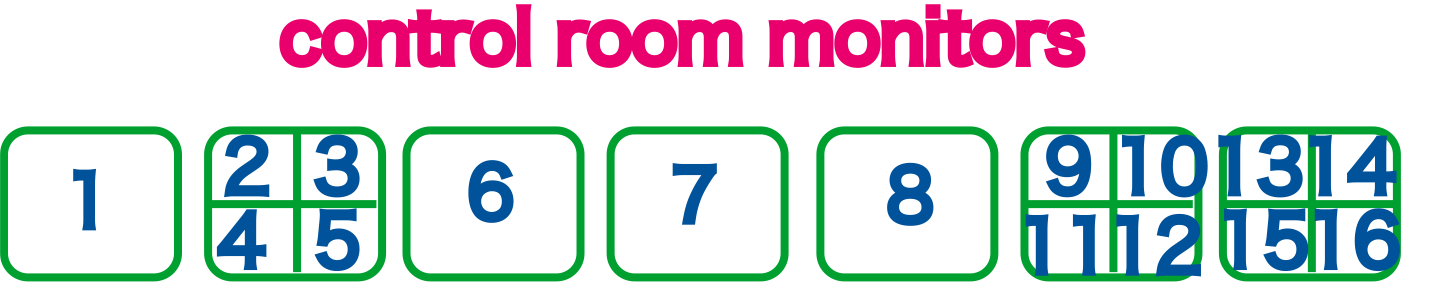
ccd/monitor arrangement
attachment:CCD_OCT3.pdf attachment:CCD_OCT3.png
Note that this diagram is for VIDEO system upgrades so Y is used for East arm and X is used for South arm.
Please use this diagram for just finding the rough position of monitor or cameras because the system is not upgraded yet.
Upgrade Plan is available at http://nodus.ligo.caltech.edu:8080/40m/4139